Why K-12 Schools Are Replacing Paper Attendance Sheets in 2026 (And What's Working Instead)
For Principals, Assistant Principals and School Administrators






It’s April. State testing is live. End-of-year audits are 6 weeks away.
And somewhere in your building right now, a teacher just lost the attendance sheet.
You’re not going to get angry about it. Because you’ve been here before. The folder of inconsistent records. The sub who skipped roll call entirely. The three hours you spent last May manually compiling data for a district report that should have taken 20 minutes.
Paper attendance isn’t just inconvenient. It’s a liability. In 2026, there’s no reason to carry it anymore.
Across the U.S., K-12 schools are switching to digital check-in systems at a pace we haven’t seen before. The principals making the move aren’t doing it because it’s trendy. They’re doing it because they’re tired of carrying a broken process into high-stakes season after high-stakes season.
This post breaks down exactly why it’s happening now, what the best schools are doing differently, and what you need to know before you evaluate any system.
What Paper Attendance Is Actually Costing Your School
Most conversations about paper attendance focus on inconvenience. The real cost is much higher. It shows up in four places that hit principals hardest.
| Issue | Paper Attendance | Digital Attendance (OneTap) | ||
|---|---|---|---|---|
| Compliance reporting | Manual folder of sheets. Takes 2 to 3 weeks every May | One-click export in under 2 minutes | ||
| State funding records | Missing or illegible sheets can trigger a funding gap | Every check-in timestamped and audit-ready | ||
| Emergency accountability | Sign-out sheet is inside the building during an evacuation | Live headcount on your phone from the parking lot | ||
| Substitute coverage | Subs skip it or create records that don't match | Kiosk records attendance automatically, no sub involvement | ||
| Parent disputes | No timestamp, no proof. Just a folder | Timestamped log with check-in method (signature, photo) | ||
| Daily admin time | 5 to 10 minutes per class, per teacher, every day | Zero teacher time. Students self check-in | ||
| End-of-year reporting | 1 to 3 weeks of manual data compilation | Single export in under an afternoon | ||
| IT setup required | None for paper, but no usable data either | None. Works on web dashboard, existing iPads and iPhones | ||
Here is what each of those rows looks like in practice.
The Compliance Risk That Spikes Every April
In April and May, attendance accuracy is not optional. It is a legal requirement. States including California, Texas, Florida, and New York require precise, verifiable attendance records tied to standardized testing windows. A missing sheet, an illegible entry, or a substitute’s inconsistent record doesn’t just create extra work. It can trigger a resubmission request or a formal audit.
When a district auditor asks for records, paper gives you a folder. Digital gives you a timestamped, exportable, legally defensible report, generated in one click.
Inaccurate Attendance Can Cost Your School Money
In most U.S. states, school funding is calculated directly from Average Daily Attendance records. The paper sheet a teacher fills out, the one a substitute skips or loses on a Friday afternoon, is not just an administrative detail. It is a line item in your state funding calculation.
Gina T., a testing coordinator managing a virtual school across multiple Texas cities and 650 students, put it plainly:
“That’s how we’re paid. That’s how we get our money.”
— Testing Coordinator, Virtual K-12 School, Texas
A missing sheet doesn’t just create an audit flag. In some cases, it’s revenue that never arrives.
In April and May, attendance accuracy is not optional. It is a legal requirement. States including California, Texas, Florida, and New York require precise, verifiable attendance records tied to standardized testing windows. A missing sheet, an illegible entry, or a substitute’s inconsistent record doesn’t just create extra work. It can trigger a resubmission request or a formal audit.
When a district auditor asks for records, paper gives you a folder. Digital gives you a timestamped, exportable, legally defensible report, generated in one click.
The Safety Risk Nobody Talks About
Here’s the angle most principals haven’t considered yet. At least, not until they’ve lived it.
Paper sign-out sheets live in a specific room. In a fire, a lockdown, or an emergency evacuation, that room may be inaccessible. You’re standing in the parking lot and someone asks the question you can’t answer: who’s on campus right now, and who isn’t?
Jordan Klein, an administrator managing open campus privileges for 150 high school juniors and seniors, described exactly this scenario when evaluating why paper wasn’t working:
“In an emergency situation – a fire, a lockdown – if we have to evacuate the building, we might not be able to get to that area to grab the sheet. So then we don’t know who’s here and who’s not, who’s maybe in danger, who’s at home.”
— Jordan Klein, Administrator, High School
With digital attendance, the data lives in the cloud. You pull it up on your phone, standing in the parking lot, in real time. That distinction is not a feature comparison. It’s a safety decision.
The Daily Time Drain Nobody Accounts For
Research consistently shows teachers spend 5 to 10 minutes per class period on attendance administration. Run the math for your school:
That’s nearly 18 hours every day going to a process invented before the photocopier.
No Audit Trail When Parents Push Back
When a parent disputes an absence, paper gives you nothing. No timestamp. No verification method. No way to prove when or how the record was created.
Dan Kessler, a principal managing 522 students, described the exact scenario that drives most administrators to switch:
“If a parent at the end of May says ‘My kid was definitely here that day’ — well, they were marked absent. Let me check if they even swiped in. They didn’t. Now I know they weren’t here. We have no record of them being here.”
— Dan Kessler, Principal, Public K-8 School
End-of-Year Reporting That Costs Weeks
Principals running paper-based systems consistently report spending one to three weeks compiling annual attendance data for district and state submission. Schools on digital systems run the same report in a single export, often in under ten minutes.
Already on a Digital System That's Failing You?
Many K-12 administrators we speak with are not on paper anymore. They’re on a clunky legacy system that promised to solve the problem and made it worse instead.
“It’s a round peg in a square hole. I’m basically paying $2,000 a year for it to just scan kids in. It screwed up our attendance pretty badly. And then I had to fix it.”
— Dan Kessler, on his previous K-12 attendance platform
If your current system requires manual spreadsheet exports, can’t sync with your SIS, needs your IT team for basic changes, or leaves you rebuilding data before every audit, you are not saving time. You are just moving the paperwork to a different format.
The right system doesn’t just digitize the old process. It replaces it.
Why 2026 Is the Tipping Point
Schools have been aware of these problems for years. Three things converged in 2024 and 2025 that made digital attendance not just better. It became the obvious choice.
1. QR Code Check-In Became Zero-Friction
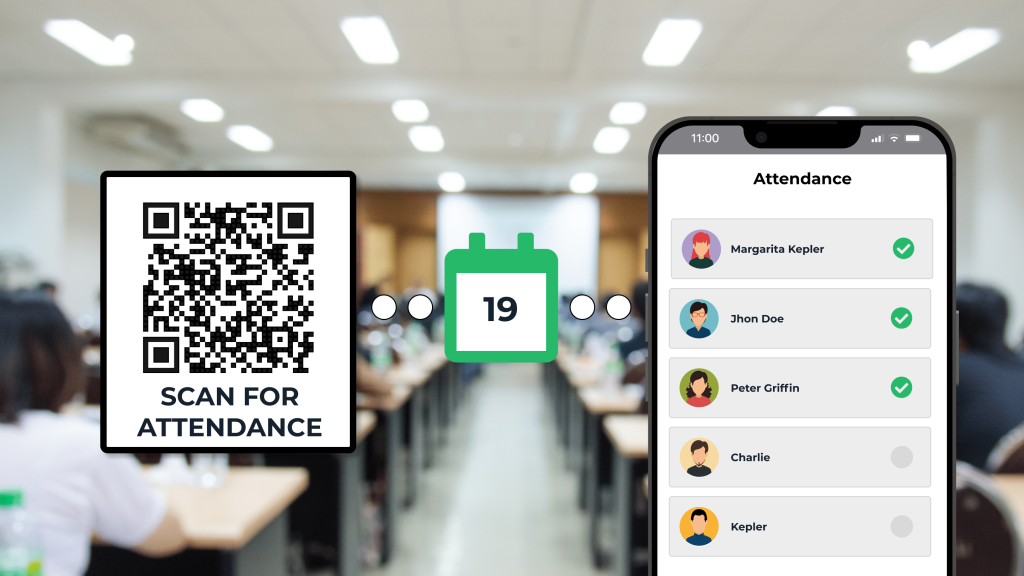
Every student already has a phone. QR-based check-in requires no new hardware, no student app download, and no teacher training. Students scan with their phone camera and the record logs instantly. The barrier to adoption dropped to nearly zero.
2. Kiosk Mode Made Attendance Teacher-Independent
Schools now place a single iPad at the classroom or building entrance. Students tap their name or scan as they walk in. Attendance is recorded automatically, whether or not the teacher is in the room. This completely solves the substitute coverage problem. No more missing records. No more days that weren’t captured.
3. Compliance Pressure Increased and Budgets Got Squeezed
Post-pandemic, state education departments significantly tightened granular daily attendance reporting requirements. At the same time, many schools found legacy attendance systems costing $1,500 to $2,500 per year for features they weren’t fully using. Modern systems now deliver more functionality at half the price.
What Principals Are Saying After They Switch
The feedback from K-12 schools that have made the transition is consistent. Three outcomes come up in every conversation.
Compliance Reporting Dropped From Weeks to Minutes
“I used to spend two full weeks every May pulling paper records for state submission. After switching to a digital system, the same report takes less than ten minutes.”
— Assistant Principal, Public Middle School, Texas
The Parent Contact Problem Disappeared
Roman Varakuta, a principal at a private K-8 school, described the feature that made OneTap stand out from every competitor he evaluated:
“I need to call a parent and the information is right there. I don’t have to go to the main office, find their number, call. That part I love right away. I can zero in on only those parents and deal with them directly, instead of sending a mass message to everybody and irritating the parents who do a good job.”
— Roman Varakuta, Principal, Private K-8 School
Testing Day Went From Chaos to Simple
For virtual schools and large districts, state testing windows are the highest-stakes attendance days of the year. Gina Thompson managed 650 students across Dallas, Houston, Austin, and San Antonio simultaneously.
With QR code check-in, her team prints multiple copies of the QR code and posts them across the testing venue. Parents scan from their phones as students arrive. No lines. No paper. No delay before the test window opens.
Teachers Stopped Asking for Help
“My teachers stopped asking me for help with attendance. That’s not a small thing — those requests were constant. Lost sheets, late entries, substitute records that didn’t match. They just stopped.”
— Assistant Principal, High School, California
The Check-In Methods Replacing Paper Sheets in 2026
The best schools are not just going paperless. They are choosing from a menu of methods that fit different classroom and campus realities. A good platform supports all of these from a single interface.
| Method | How Students Check In | Best For | Hardware Needed | ||||
|---|---|---|---|---|---|---|---|
| QR Code | Scan with phone camera, no app download | High school, middle school, testing sites, off-campus | Any student smartphone | ||||
| Kiosk Mode | Tap name or scan ID on a shared iPad at the door | Large schools, after-school programs, building entry | 1 iPad per entry point | ||||
| Digital Roster | Teacher marks attendance on a tablet or phone | Elementary classrooms, teacher-controlled check-in | Teacher's phone or tablet | ||||
| Barcode / ID Card | Scan existing student ID barcode | Schools already using ID cards with barcodes | Existing ID cards and iPad kiosk to scan | ||||
| Off-Campus QR | Student scans location-specific QR at the site | Internships, career tech, dual enrollment programs | Student smartphone | ||||
| Self-Registration | Student scans QR, link and registers themselves | New student intake, events, after-school sign-ups | Any smartphone, laptop, or kiosk | ||||
QR Code Check-In
Each class or session has a unique QR code. Students scan with their phone camera, with no app download required. Records log instantly with timestamp. Multiple QR codes can be posted across large venues for faster check-in at testing sites. Best for middle school, high school, and any setting where students arrive independently.
Self-Service Kiosk Mode
One iPad at the door. Students tap their name or scan their ID as they enter. No teacher involvement required. Attendance happens automatically regardless of who is managing the room. This completely solves the substitute coverage problem.
Digital Teacher Roster
For teachers who prefer to control the process, a digital list replaces the paper sheet entirely. The teacher marks attendance on a tablet or phone. Records sync automatically to the administrative dashboard, available to you in real time, no waiting for a form.

Existing Student Barcode ID Check-In
Schools that already issue ID cards with barcodes can use existing cards as check-in passes. No new cards, no new infrastructure. Students scan their current ID on a kiosk or admin device.
Off-Campus and Hybrid Program Check-In
For students in internships, career tech placements, or off-campus programs, each location gets its own QR code. Students scan when they arrive and leave. The attendance officer at the main campus sees the real-time log without a single phone call. District accountability requirements are satisfied automatically.
Which Setup Is Right for Your School?
Different school types face different attendance challenges. Here is how the right OneTap configuration maps to each one.
| School Type | Main Attendance Challenge | Recommended OneTap Setup | ||
|---|---|---|---|---|
| Public K-12 (500+ students) | Replacing a broken legacy system, barcode ID cards already in use | Barcode check-in via kiosk + admin dashboard reporting | ||
| Private K-12 (under 200 students) | Paper getting messy, need parent contact + tardy visibility | QR code or kiosk check-in + parent contact profiles | ||
| High School (open campus) | Tracking who is on campus vs. off campus in real time | Student QR self check-in with location and time restriction | ||
| Virtual School | Managing attendance across multiple test sites in multiple cities | Site-specific recurring lists + QR codes posted at each venue | ||
| District (10+ schools) | 19 separate logins, no central management or reporting | Single admin account, site-specific lists, collaborator access | ||
| After-School Program | Satisfying federal grant attendance reporting requirements | Kiosk self check-in + one-click daily export | ||
| Hybrid / Off-Campus Program | Students at internship or career tech sites with no staff on hand | Location QR codes + real-time dashboard for campus admin | ||
What to Require from Any Attendance System You Evaluate
Don’t let a vendor demo distract you from the criteria that actually drive school-wide adoption and protect you when it matters.
- Real-time administrative dashboard: See live attendance across every classroom from one screen. Not after teachers submit a form. Right now.
- One-click attendance report exports for state compliance: Daily summaries, period-by-period breakdowns, and individual student histories, all formatted for your state. Not a generic spreadsheet.
- Multiple check-in methods in one platform: QR codes, kiosk mode, manual roster, and barcode scanning. One method means incomplete adoption.
- Works on devices you already own: No dedicated hardware purchase. The system runs on iPads and iPhones your school already has.
- Student data stays simple. OneTap only captures check-in timestamps, student names, and any custom fields your school chooses to include. It does not collect or store academic records, grades, or disciplinary files. No sensitive student records ever leave your school through OneTap.
- Secure data storage: Confirm encryption, cloud-based attendance system, and team access controls.
- No IT dependency for setup: If your IT team needs to be involved to deploy it, your timeline just got six weeks longer.
- Parent contact info in the attendance record: When attendance triggers an action, the parent contact should be one tap away. Not buried in a separate system.
The April Window: Why Acting Now Matters More Than You Think
If you’re reading this in March, April, or May, you are in the most compliance-sensitive and financially consequential window of the school year.
State testing attendance requirements are active right now. End-of-year audit preparation is starting. Your state funding calculation is being built from records being created this week. And every week you continue with paper, you’re adding to the reporting backlog that lands on your desk in May.
⚡ Modern digital attendance systems deploy in a single afternoon. No IT setup. No school-wide training. No disruption to existing schedules. A principal can have digital check-in running by the following morning.
But the more important reason to act now is this:
Schools that switch in April finish the year with a full semester of clean, digital attendance data. When September comes, they are refining a system that works. They are not starting from scratch with the same compliance pressure waiting for them next spring.
Schools that wait until September start over. Every year. The cycle breaks when you decide to break it.
Bringing This to Your Supervisor? Here's the One-Paragraph Case
Most administrators don’t make this decision alone. They bring it to a principal, a director, or a district budget holder. Here’s the case that closes it:
Script for Your Approval Conversation:
“We are currently losing up to 25 hours of instruction time every week to paper attendance. During state testing season, our funding calculation depends on records that could be missing, illegible, or never submitted. If we ever need to evacuate this building, our sign-out records are inside it. OneTap is $839.88/year (up to 500 profiles), less than half of what most schools pay for a legacy system, and we can be live by tomorrow morning without involving IT.”
How OneTap Check-In Is Being Used in K-12 Schools Right Now
OneTap Check-In is an attendance app built specifically for how K-12 schools actually operate, not how software vendors wish they did.
- Principals see real-time attendance across every classroom from a single dashboard.
- Assistant principals generate state-compliant summaries in under a minute, not two weeks.
- Teachers choose QR codes, kiosk mode, or the digital roster depending on their classroom, all feeding into the same record.
- After-school coordinators satisfy federal grant reporting requirements with zero administrative overhead.
- Testing coordinators manage 650 students across multiple cities on test day with QR codes posted at each venue.
- District administrators manage 19 or more school locations under a single login with site-specific access controls.
OneTap runs on existing iPads and iPhones. No hardware purchase required. No IT involvement. Setup takes one session.
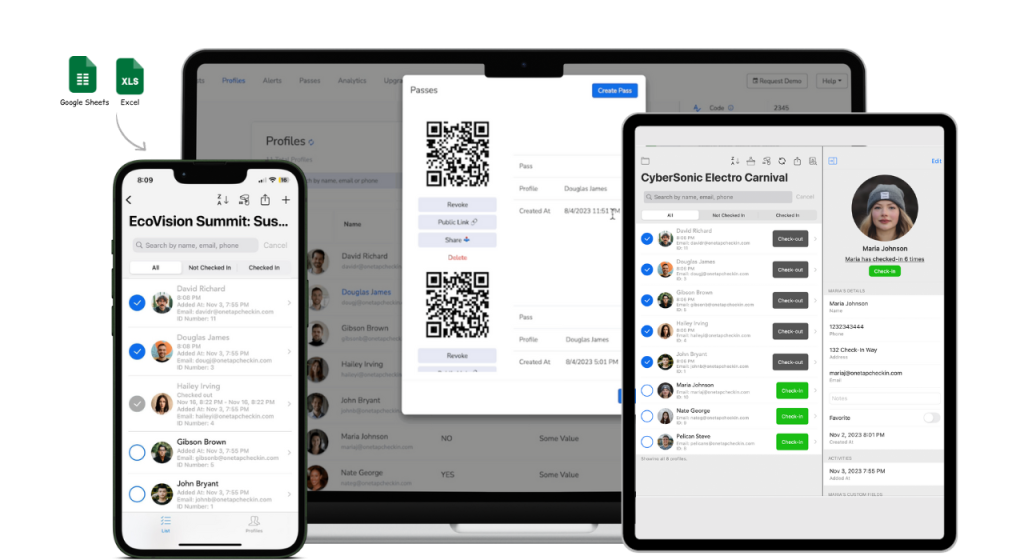
Schools using OneTap report that end-of-year attendance reporting, previously a multi-week process, now takes less than an afternoon.
How OneTap Compares to Legacy Attendance Systems
If you are evaluating OneTap alongside an existing platform or a competitor, here is a direct comparison on the criteria that matter most to school administrators.
| Feature | Legacy Systems (e.g., Swipe K12) | OneTap Check-In & Attendance App | ||
|---|---|---|---|---|
| Annual cost | $1,500 to $2,500/year | $839.88/year (up to 500 profiles) | ||
| Setup time | Weeks, requires IT involvement | One afternoon, no IT needed | ||
| Hardware required | Dedicated scanners or proprietary kiosks | Existing iPads and iPhones | ||
| SIS sync (e.g., PowerSchool) | Often buggy, corrupts data with complex schedules | Standalone with optional API integration | ||
| Check-in methods | Usually barcode or one method only | QR code, kiosk, QR/Barcode passes, Admin attendance | ||
| Emergency accountability | Data locked in on-site system | Cloud-based. Access from any device, anywhere | ||
| Export attendance data | Manual data pull or third-party tool | One-click export in CSV or PDF format | ||
| Substitute coverage | Manual. Subs often skip or create bad records | Automatic via kiosk. No sub action needed | ||
| Parent contact access | Separate system or binder at the front desk | Built into each student profile in the app | ||
| Off-campus / multi-site | Not designed for it | Unlimited lists, locations, and collaborators | ||
| Student data stored | Full academic and behavioral records tied to SIS | Check-in timestamps and names only. No academic records. | ||
| Contract required | Often annual contracts with early exit fees | No contract. Monthly or annual, cancel anytime | ||
 OneTap starts at $839.88/year (up to 500 profiles). That is less than half the cost of most legacy K-12 systems, with no hardware requirements and same-day setup.
Ready to See It in Your School?
Most principals are set up and running same-day. No contract required. No IT setup needed.
Frequently Asked Questions
Most schools are fully configured in under two hours, including class lists, teacher accounts, and check-in methods, all without IT support. A principal can complete setup in a single session and have teachers running digital check-in the following morning.
No. QR code check-in and kiosk mode both work without students downloading anything. Students scan a code with their phone's native camera, or tap their name on a shared iPad screen. Zero friction, zero installs.
This is one of the strongest arguments for going digital. Kiosk and QR check-in work automatically regardless of who is managing the classroom, ensuring consistent records on every sub coverage day without any staff training.
Yes. OneTap generates daily summaries, period-by-period breakdowns, and individual student attendance histories with one click. Testing coordinators managing students across multiple sites can create location-specific lists and run consolidated reports across all sites. That is exactly the documentation your state funding calculation requires.
Yes. Schools that already issue barcode ID cards can import those barcode values into OneTap. Students use their existing cards with no new cards and no new hardware needed beyond the camera on a kiosk iPad.
Most schools maintain historical paper records per their state's retention policy, and move all new attendance to digital from the switch date forward. OneTap does not require retroactive data entry. You start clean from day one.
You can start tracking electronic attendance for free for upto 20 profiles. OneTap starts at $839.88/year (up to 500 profiles), with no hidden fees and no hardware requirements.
No. OneTap is a check-in and attendance app, not a student information system. It only captures what you give it and typically a student name, a check-in timestamp, and any custom fields your school adds, such as a grade level or emergency contact number. OneTap does not collect or store academic records, grades, disciplinary files, or any other data covered under FERPA. That means no complex vendor data agreements, no sensitive records in a third-party system, and a straightforward privacy conversation with your district.
Ready to Simplify Your School Attendance Management?
OneTap Check-In is a QR code and kiosk attendance app trusted by K-12 schools, after-school programs, and higher education institutions across the United States.